

Note
Go to the end to download the full example code or to run this example in your browser via Binder.
Binning#
Binning is a technique used to group continuous values into a smaller number of bins. This is particularly useful when you have irregularly distributed data and want to analyze it on a regular grid. In this example, we will use pyinterp’s 2D binning functionality to calculate drifter velocity statistics in the Black Sea over a 9-year period.
import cartopy.crs
import matplotlib.pyplot
import numpy

import pyinterp
import pyinterp.tests
Loading the Data#
First, we load the drifter data, which includes longitude, latitude, and velocity components (u and v).
ds = pyinterp.tests.load_aoml()
We then calculate the velocity magnitude from the u and v components.
Defining the Grid#
Next, we define the 2D grid on which we will bin the data. The grid is defined by two axes: one for longitude and one for latitude.
binning = pyinterp.Binning2D(
    pyinterp.Axis(numpy.arange(27, 42, 0.3, dtype=numpy.float64),
                  period=360.0,),
    pyinterp.Axis(numpy.arange(40, 47, 0.3, dtype=numpy.float64)))
print(binning)
<pyinterp.core.Binning2DFloat64 object at 0x7e2d0243fd70>
Simple Binning#
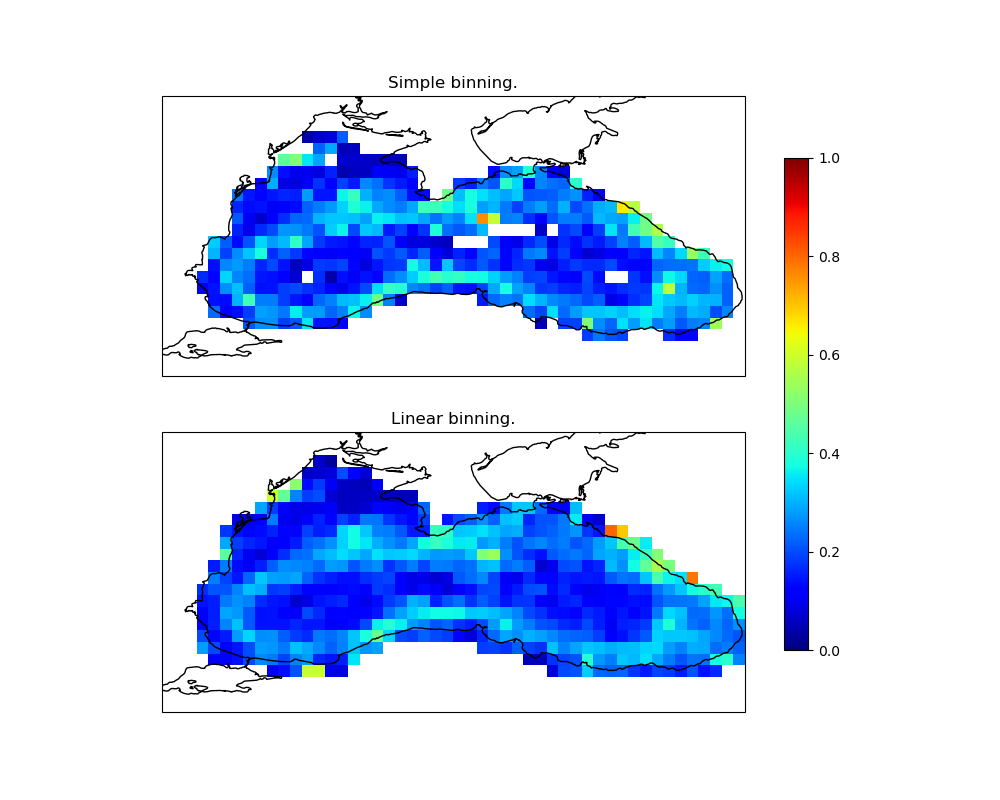
With simple binning, each data point is assigned to the bin that contains its coordinates. We push the data into the bins and then compute the mean of the values in each bin.
binning.clear()
binning.push(ds.lon.values, ds.lat.values, norm.values, simple=True)
simple_mean = binning.mean()
Note
For datasets larger than the available RAM, you can use Dask for parallel
computation with pyinterp.dask.binning2d(). It takes Dask arrays and
a pyinterp.Binning2D instance describing the bins, and returns a
new instance holding the accumulated statistics. The instance you pass in is
copied internally and left untouched.
import dask.array as da
import pyinterp.dask

result = pyinterp.dask.binning2d(
    da.from_array(lon, chunks=100_000),
    da.from_array(lat, chunks=100_000),
    da.from_array(data, chunks=100_000),
    binning)
simple_mean = result.mean()
You can also compute other statistics with the dedicated methods:
variance,
min,
max,
count, and so on.
Linear Binning#
Linear binning is a more advanced technique where each data point contributes to the four surrounding grid nodes with bilinear weights: the weight of a node is the area of the sub-rectangle opposite to it, so the closer the node, the larger its weight. This generally produces a smoother result.
binning.clear()
binning.push(ds.lon.values, ds.lat.values, norm.values, simple=False)
linear_mean = binning.mean()
Visualizing the Results#
Finally, we visualize the results of both simple and linear binning.
fig = matplotlib.pyplot.figure(figsize=(10, 8))
fig.subplots_adjust(left=0.05, right=0.95, top=0.95, bottom=0.05, hspace=0.25)
ax1 = fig.add_subplot(211, projection=cartopy.crs.PlateCarree())
lon, lat = numpy.meshgrid(binning.x, binning.y, indexing='ij')
pcm = ax1.pcolormesh(lon,
                     lat,
                     simple_mean,
                     cmap='viridis',
                     shading='auto',
                     vmin=0,
                     vmax=1,
                     transform=cartopy.crs.PlateCarree())
ax1.set_extent([27, 42, 40, 47], crs=cartopy.crs.PlateCarree())
ax1.coastlines()
ax1.set_title('Simple Binning')

ax2 = fig.add_subplot(212, projection=cartopy.crs.PlateCarree())
pcm = ax2.pcolormesh(lon,
                     lat,
                     linear_mean,
                     cmap='viridis',
                     shading='auto',
                     vmin=0,
                     vmax=1,
                     transform=cartopy.crs.PlateCarree())
ax2.set_extent([27, 42, 40, 47], crs=cartopy.crs.PlateCarree())
ax2.coastlines()
ax2.set_title('Linear Binning')
fig.colorbar(pcm, ax=[ax1, ax2], shrink=0.8)
<matplotlib.colorbar.Colorbar object at 0x7e2ce4941fd0>
Histogram2D#
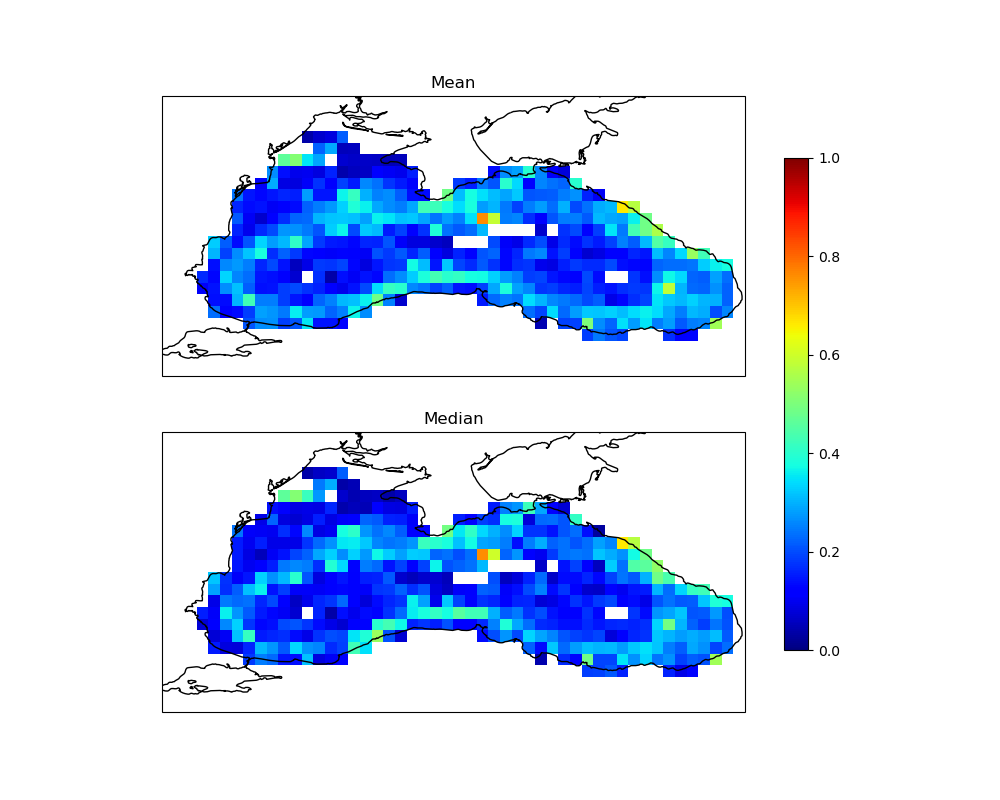
The Histogram2D class is similar to the
Binning2D class, but instead of accumulating
statistics, each bin stores the distribution of its values with the
TDigest algorithm, which also allows quantiles
to be estimated.
Let’s calculate the 2D histogram of the drifter data.
hist = pyinterp.Histogram2D(
    pyinterp.Axis(numpy.arange(27, 42, 0.3, dtype=numpy.float64),
                  period=360.0,),
    pyinterp.Axis(numpy.arange(40, 47, 0.3, dtype=numpy.float64)))
hist.push(ds.lon.values, ds.lat.values, norm.values)
We can then visualize the histogram.
fig = matplotlib.pyplot.figure(figsize=(10, 4))
fig.subplots_adjust(left=0.05, right=0.95, top=0.95, bottom=0.05, hspace=0.25)
ax1 = fig.add_subplot(111, projection=cartopy.crs.PlateCarree())
pcm = ax1.pcolormesh(lon,
                     lat,
                     hist.mean(),
                     cmap='viridis',
                     shading='auto',
                     transform=cartopy.crs.PlateCarree())
ax1.set_extent([27, 42, 40, 47], crs=cartopy.crs.PlateCarree())
ax1.coastlines()
ax1.set_title('2D Histogram')
fig.colorbar(pcm, ax=ax1, shrink=0.8)
<matplotlib.colorbar.Colorbar object at 0x7e2ce4afcec0>
Total running time of the script: (0 minutes 1.346 seconds)
