Note
Go to the end to download the full example code or to run this example in your browser via Binder.
4D Interpolation#
This example demonstrates how to perform 4D interpolation on a regular grid. The pyinterp library supports both quadrivariate and bicubic interpolation for 4D data.
import cartopy.crs
import matplotlib
import matplotlib.pyplot
import numpy

import pyinterp
import pyinterp.backends.xarray
import pyinterp.tests
Quadrivariate Interpolation#
Quadrivariate interpolation builds upon trivariate interpolation by adding a fourth dimension. It first performs bilinear interpolation on the 2D spatial plane (longitude and latitude), followed by linear interpolation along the third and fourth dimensions. If desired, you can use nearest-neighbor interpolation for the third and fourth dimensions by specifying third_axis=’nearest’ and fourth_axis=’nearest’. In this example, we will load a 4D dataset and create the interpolator object. First, we load the 4D dataset and create the interpolator object.
ds = pyinterp.tests.load_grid4d()
interpolator = pyinterp.backends.xarray.Grid4D(ds.pressure)
Next, we define the coordinates for interpolation.
mx, my, mz, mu = numpy.meshgrid(
    numpy.arange(-125, -70, 0.5),
    numpy.arange(25, 50, 0.5),
    numpy.datetime64("2000-01-01T12:00"),
    0.5,
    indexing="ij",
)
Now, we perform the quadrivariate interpolation.
quadrivariate = interpolator.quadrivariate(
    {
        "longitude": mx.ravel(),
        "latitude": my.ravel(),
        "time": mz.ravel(),
        "level": mu.ravel(),
    }
).reshape(mx.shape)
Windowed Interpolators#
Bicubic and spline interpolation provides smoother results compared to
bilinear by using a windowed approach that considers a neighborhood of grid
points within a calculation window. You can use it by passing
method='bicubic' to the quadrivariate method.
We then perform the bicubic interpolation.
To visualize the results, we reshape the output arrays and extract the longitude and latitude coordinates.
quadrivariate = quadrivariate.squeeze(axis=(2, 3))
bicubic = bicubic.squeeze(axis=(2, 3))
lons = mx[:, 0].squeeze()
lats = my[0, :].squeeze()
Finally, let’s plot the results of both quadrivariate and bicubic interpolation.
Note
The resolution of the example grid is low (one pixel per degree), so the bicubic interpolation may not find enough pixels at the edges, resulting in undefined values.
fig = matplotlib.pyplot.figure(figsize=(10, 8))
fig.subplots_adjust(left=0.05, right=0.95, top=0.95, bottom=0.05, hspace=0.25)
ax1 = fig.add_subplot(
    211, projection=cartopy.crs.PlateCarree(central_longitude=180)
)
ax1.set_extent(
    [lons.min(), lons.max(), lats.min(), lats.max()],
    crs=cartopy.crs.PlateCarree(),
)
pcm = ax1.pcolormesh(
    lons,
    lats,
    quadrivariate.T,
    cmap="jet",
    shading="auto",
    transform=cartopy.crs.PlateCarree(),
)
ax1.coastlines()
ax1.set_title("Quadrivariate Interpolation")
ax2 = fig.add_subplot(
    212, projection=cartopy.crs.PlateCarree(central_longitude=180)
)
ax2.set_extent(
    [lons.min(), lons.max(), lats.min(), lats.max()],
    crs=cartopy.crs.PlateCarree(),
)
pcm = ax2.pcolormesh(
    lons,
    lats,
    bicubic.T,
    cmap="jet",
    shading="auto",
    transform=cartopy.crs.PlateCarree(),
)
ax2.coastlines()
ax2.set_title("Bicubic Interpolation")
fig.colorbar(pcm, ax=[ax1, ax2], shrink=0.8)
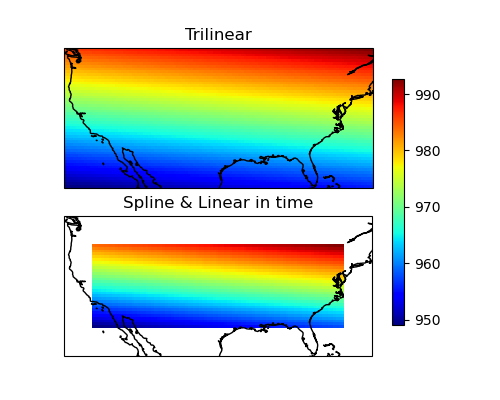
<matplotlib.colorbar.Colorbar object at 0x11feceba0>
Total running time of the script: (0 minutes 0.665 seconds)
