Note
Go to the end to download the full example code or to run this example in your browser via Binder.
Basic Geometric Primitives#
This example demonstrates the fundamental geometric objects available in the
pyinterp.geometry module. These primitives form the building blocks for
spatial operations in both geographic (lon/lat on a spheroid) and cartesian
(x/y plane) coordinate systems.
The geometry module provides a comprehensive set of primitives that mirror standard GIS formats like WKT and GeoJSON, making it easy to work with spatial data from various sources.
Primitives Covered:
Class |
Description |
|---|---|
Reference ellipsoid |
|
Single location |
|
Line between two points |
|
Rectangular area |
|
Sequence of points |
|
Closed boundary |
|
Area with optional holes |
|
Point collection |
|
LineString collection |
|
Polygon collection |
Let’s start by importing the necessary libraries.
import json

import cartopy.crs
import cartopy.feature
import matplotlib.pyplot
import numpy
from pyinterp.geometry import cartesian, geographic
Spheroid: Reference Ellipsoid#
The Spheroid class represents the
reference ellipsoid used for geodetic calculations. By default, it uses WGS84.
wgs84 = geographic.Spheroid()
print("WGS84 Properties:")
print(f"  Semi-major axis: {wgs84.semi_major_axis:,.2f} m")
print(f"  Flattening: {wgs84.flattening:.10f}")
print(f"  Mean radius: {wgs84.mean_radius():,.2f} m")
print(f"  Authalic radius: {wgs84.authalic_radius():,.2f} m")
print(f"  Equatorial circumference: {wgs84.equatorial_circumference():,.2f} m")
WGS84 Properties:
  Semi-major axis: 6,378,137.00 m
  Flattening: 0.0033528107
  Mean radius: 6,371,008.77 m
  Authalic radius: 6,371,007.18 m
  Equatorial circumference: 40,075,016.69 m
You can define custom ellipsoids by providing the semi-major axis and flattening.
grs80 = geographic.Spheroid(6378137.0, 1 / 298.257222101)
difference = abs(wgs84.semi_major_axis - grs80.semi_major_axis)
print("\nGRS80 Properties:")
print(f"  Semi-major axis: {grs80.semi_major_axis:,.2f} m")
print(f"  Flattening: {grs80.flattening:.10f}")
print(f"  Difference from WGS84: {difference:.6f} m")
GRS80 Properties:
  Semi-major axis: 6,378,137.00 m
  Flattening: 0.0033528107
  Difference from WGS84: 0.000000 m
Point: Single Geographic Location#
A Point represents a single
location defined by longitude and latitude in degrees.
paris = geographic.Point(2.3488, 48.8534)
new_york = geographic.Point(-73.9385, 40.6643)
london = geographic.Point(-0.1276, 51.5074)
tokyo = geographic.Point(139.6917, 35.6895)

print("\nGeographic Points:")
print(f"  Paris: {paris}")
print(f"  New York: {new_york}")
print(f"  London: {london}")
print(f"  Tokyo: {tokyo}")
Geographic Points:
  Paris: (2.3488, 48.8534)
  New York: (-73.9385, 40.6643)
  London: (-0.1276, 51.5074)
  Tokyo: (139.6917, 35.6895)
Points support equality comparison and hashing
Paris == Paris: True
Paris == London: False
Hash of Paris: 1223149219523137366
Segment: Line Between Two Points#
A Segment represents a straight
line between two points.
segment = geographic.Segment((paris.lon, paris.lat), (london.lon, london.lat))
print("\nSegment:")
print(f"  Start: ({segment.a.lon:.4f}, {segment.a.lat:.4f})")
print(f"  End: ({segment.b.lon:.4f}, {segment.b.lat:.4f})")
print(f"  Length: {len(segment)} points")

# Segments are iterable
for i, point in enumerate(segment):
    print(f"  Point {i}: ({point.lon:.4f}, {point.lat:.4f})")
Segment:
  Start: (2.3488, 48.8534)
  End: (-0.1276, 51.5074)
  Length: 2 points
  Point 0: (2.3488, 48.8534)
  Point 1: (-0.1276, 51.5074)
Box: Rectangular Geographic Area#
A Box defines a rectangular area
from two corner points.
box = geographic.Box((new_york.lon, new_york.lat), (paris.lon, paris.lat))
print("\nBox:")
print(f"  Min corner: ({box.min_corner.lon:.4f}, {box.min_corner.lat:.4f})")
print(f"  Max corner: ({box.max_corner.lon:.4f}, {box.max_corner.lat:.4f})")

# Get the centroid of the box
centroid = geographic.algorithms.centroid(box)
print(f"  Centroid: ({centroid.lon:.4f}, {centroid.lat:.4f})")
Box:
  Min corner: (-73.9385, 40.6643)
  Max corner: (2.3488, 48.8534)
  Centroid: (-35.7949, 44.7588)
Get the envelope (bounding box) of any geometry
Envelope: (-73.9385, 40.6643) to (2.3488, 48.8534)
LineString: Sequence of Connected Points#
A LineString represents a sequence
of connected points forming a path.
lon_array = numpy.array([0.0, 1.0, 2.0, 3.0, 4.0], dtype=numpy.float64)
lat_array = numpy.array([0.0, 1.0, 0.5, 1.5, 1.0], dtype=numpy.float64)
line = geographic.LineString(lon_array, lat_array)

print("\nLineString:")
print(f"  Number of points: {len(line)}")
print(f"  Number of segments: {geographic.algorithms.num_segments(line)}")

# LineStrings are iterable
print("  Points:")
for i, point in enumerate(line):
    print(f"    {i}: ({point.lon:.2f}, {point.lat:.2f})")
LineString:
  Number of points: 5
  Number of segments: 4
  Points:
    0: (0.00, 0.00)
    1: (1.00, 1.00)
    2: (2.00, 0.50)
    3: (3.00, 1.50)
    4: (4.00, 1.00)
You can also create an empty LineString and append points
empty_line = geographic.LineString()
empty_line.append(geographic.Point(5.0, 5.0))
empty_line.append(geographic.Point(6.0, 6.0))
print(f"\nLineString created by appending: {len(empty_line)} points")
LineString created by appending: 2 points
Calculate geometric properties
line_length = geographic.algorithms.length(line, spheroid=wgs84)
print(f"\nLineString length: {line_length * 1e-3:.3f} km")
LineString length: 562.338 km
Ring: Closed Boundary#
A Ring is a closed linestring that
forms a boundary. The first and last points must be identical.
ring_lon = numpy.array([0.0, 4.0, 4.0, 0.0, 0.0], dtype=numpy.float64)
ring_lat = numpy.array([0.0, 0.0, 3.0, 3.0, 0.0], dtype=numpy.float64)
ring = geographic.Ring(ring_lon, ring_lat)

print("\nRing:")
print(f"  Number of points: {len(ring)}")
print(f"  Is closed: {ring[0] == ring[-1]}")
Ring:
  Number of points: 5
  Is closed: True
Polygon: Closed Geographic Shape#
A Polygon represents a closed area
defined by an outer ring and optional inner rings (holes).
# Simple polygon without holes
outer_lon = numpy.array([0.0, 0.0, 5.0, 5.0, 0.0], dtype=numpy.float64)
outer_lat = numpy.array([0.0, 5.0, 5.0, 0.0, 0.0], dtype=numpy.float64)
outer_ring = geographic.Ring(outer_lon, outer_lat)
polygon = geographic.Polygon(outer_ring)

print("\nSimple Polygon:")
print(f"  Number of points: {geographic.algorithms.num_points(polygon)}")
print(
    f"  Number of interior rings: "
    f"{geographic.algorithms.num_interior_rings(polygon)}"
)

# Calculate area and perimeter
poly_area = geographic.algorithms.area(polygon, spheroid=wgs84)
poly_perimeter = geographic.algorithms.perimeter(polygon, spheroid=wgs84)
print(f"  Area: {poly_area * 1e-6:.2f} km²")
print(f"  Perimeter: {poly_perimeter * 1e-3:.3f} km")
Simple Polygon:
  Number of points: 5
  Number of interior rings: 0
  Area: 307541.81 km²
  Perimeter: 2216.848 km
Polygon with Holes#
Create a polygon with an interior hole
# Outer boundary
outer_lon = numpy.array([0.0, 0.0, 10.0, 10.0, 0.0], dtype=numpy.float64)
outer_lat = numpy.array([0.0, 10.0, 10.0, 0.0, 0.0], dtype=numpy.float64)
outer = geographic.Ring(outer_lon, outer_lat)

# Interior hole
hole_lon = numpy.array([3.0, 3.0, 7.0, 7.0, 3.0], dtype=numpy.float64)
hole_lat = numpy.array([3.0, 7.0, 7.0, 3.0, 3.0], dtype=numpy.float64)
hole = geographic.Ring(hole_lon, hole_lat)

# Create polygon with hole
polygon_with_hole = geographic.Polygon(outer, [hole])
num_interior_rings = geographic.algorithms.num_interior_rings(
    polygon_with_hole
)
print("\nPolygon with Hole:")
print(f"  Number of interior rings: {num_interior_rings}")

area_with_hole = geographic.algorithms.area(polygon_with_hole, spheroid=wgs84)
area_outer = geographic.algorithms.area(
    geographic.Polygon(outer), spheroid=wgs84
)
area_hole = geographic.algorithms.area(
    geographic.Polygon(hole), spheroid=wgs84
)
difference = abs((area_outer - area_hole) - area_with_hole)
print(f"  Outer area: {area_outer * 1e-6:.2f} km²")
print(f"  Hole area: {area_hole * 1e-6:.2f} km²")
print(f"  Effective area: {area_with_hole * 1e-6:.2f} km²")
print(
    f"  Expected area: {(area_outer - area_hole) * 1e-6:.2f} km² "
    f"(difference: {difference * 1e-6:.6f} km²)"
)
Polygon with Hole:
  Number of interior rings: 1
  Outer area: 1227877.09 km²
  Hole area: 196255.19 km²
  Effective area: 1424132.29 km²
  Expected area: 1031621.90 km² (difference: 392510.388332 km²)
MultiPoint: Collection of Points#
MultiPoint represents a collection
of geographic points.
# Create from arrays
lons = numpy.array(
    [paris.lon, new_york.lon, london.lon, tokyo.lon], dtype=numpy.float64
)
lats = numpy.array(
    [paris.lat, new_york.lat, london.lat, tokyo.lat], dtype=numpy.float64
)
cities = geographic.MultiPoint(lons, lats)
num_geometries = geographic.algorithms.num_geometries(cities)
print("\nMultiPoint:")
print(f"  Number of points: {len(cities)}")
print(f"  Number of geometries: {num_geometries}")

# MultiPoints are iterable
print("  Cities:")
for i, city in enumerate(cities):
    print(f"    {i}: ({city.lon:.4f}, {city.lat:.4f})")
MultiPoint:
  Number of points: 4
  Number of geometries: 4
  Cities:
    0: (2.3488, 48.8534)
    1: (-73.9385, 40.6643)
    2: (-0.1276, 51.5074)
    3: (139.6917, 35.6895)
You can also create from a list of Point objects
point_list = [paris, london, tokyo]
cities_from_list = geographic.MultiPoint(point_list)
print(f"\nMultiPoint from list: {len(cities_from_list)} points")
MultiPoint from list: 3 points
MultiLineString: Collection of LineStrings#
MultiLineString represents a
collection of linestrings.
line1 = geographic.LineString(
    numpy.array([0.0, 1.0, 2.0], dtype=numpy.float64),
    numpy.array([0.0, 1.0, 2.0], dtype=numpy.float64),
)
line2 = geographic.LineString(
    numpy.array([3.0, 4.0, 5.0], dtype=numpy.float64),
    numpy.array([3.0, 4.0, 5.0], dtype=numpy.float64),
)
line3 = geographic.LineString(
    numpy.array([1.0, 2.0, 3.0], dtype=numpy.float64),
    numpy.array([3.0, 2.0, 1.0], dtype=numpy.float64),
)

multiline = geographic.MultiLineString([line1, line2, line3])
num_geometries = geographic.algorithms.num_geometries(multiline)
print("\nMultiLineString:")
print(f"  Number of lines: {len(multiline)}")
print(f"  Number of geometries: {num_geometries}")

# MultiLineStrings are iterable
total_length = 0.0
for i, line in enumerate(multiline):
    length = geographic.algorithms.length(line, spheroid=wgs84)
    total_length += length
    print(f"  Line {i}: {len(line)} points, {length * 1e-3:.3f} km")

print(f"  Total length: {total_length * 1e-3:.3f} km")
MultiLineString:
  Number of lines: 3
  Number of geometries: 3
  Line 0: 3 points, 313.772 km
  Line 1: 3 points, 313.421 km
  Line 2: 3 points, 313.702 km
  Total length: 940.895 km
MultiPolygon: Collection of Polygons#
MultiPolygon represents a
collection of polygons.
poly1_lon = numpy.array([0.0, 0.0, 3.0, 3.0, 0.0], dtype=numpy.float64)
poly1_lat = numpy.array([0.0, 3.0, 3.0, 0.0, 0.0], dtype=numpy.float64)
poly1 = geographic.Polygon(geographic.Ring(poly1_lon, poly1_lat))

poly2_lon = numpy.array([5.0, 5.0, 8.0, 8.0, 5.0], dtype=numpy.float64)
poly2_lat = numpy.array([5.0, 8.0, 8.0, 5.0, 5.0], dtype=numpy.float64)
poly2 = geographic.Polygon(geographic.Ring(poly2_lon, poly2_lat))

poly3_lon = numpy.array([10.0, 10.0, 12.0, 12.0, 10.0], dtype=numpy.float64)
poly3_lat = numpy.array([0.0, 2.0, 2.0, 0.0, 0.0], dtype=numpy.float64)
poly3 = geographic.Polygon(geographic.Ring(poly3_lon, poly3_lat))

multipoly = geographic.MultiPolygon([poly1, poly2, poly3])
num_geometries = geographic.algorithms.num_geometries(multipoly)
print("\nMultiPolygon:")
print(f"  Number of polygons: {len(multipoly)}")
print(f"  Number of geometries: {num_geometries}")

# MultiPolygons are iterable
total_area = 0.0
for i, poly in enumerate(multipoly):
    area = geographic.algorithms.area(poly, spheroid=wgs84)
    total_area += area
    print(f"  Polygon {i}: {area * 1e-6:.4f} km²")

print(f"  Total area: {total_area * 1e-6:.4f} km²")
MultiPolygon:
  Number of polygons: 3
  Number of geometries: 3
  Polygon 0: 110757.7957 km²
  Polygon 1: 110100.4965 km²
  Polygon 2: 49231.5842 km²
  Total area: 270089.8764 km²
Serialization: WKT and GeoJSON#
All geometry types can be serialized to Well-Known Text (WKT) and GeoJSON formats.
print("\nSerialization Examples:")

# Point to WKT and GeoJSON
point_wkt = geographic.algorithms.to_wkt(paris)
point_geojson = geographic.algorithms.to_geojson(paris)
print(f"\nPoint WKT: {point_wkt}")
print(f"Point GeoJSON: {point_geojson}")

# LineString to WKT and GeoJSON
line_wkt = geographic.algorithms.to_wkt(line)
line_geojson = geographic.algorithms.to_geojson(line)
print(f"\nLineString WKT: {line_wkt}")
geojson_obj = json.loads(line_geojson)
print(f"LineString GeoJSON type: {geojson_obj['type']}")

# Polygon to WKT and GeoJSON
poly_wkt = geographic.algorithms.to_wkt(polygon)
poly_geojson = geographic.algorithms.to_geojson(polygon)
print(f"\nPolygon WKT: {poly_wkt}")
geojson_obj = json.loads(poly_geojson)
print(f"Polygon GeoJSON type: {geojson_obj['type']}")

# MultiPoint to GeoJSON
multipoint_geojson = geographic.algorithms.to_geojson(cities)
geojson_obj = json.loads(multipoint_geojson)
print(f"\nMultiPoint GeoJSON type: {geojson_obj['type']}")
print(f"Number of coordinates: {len(geojson_obj['coordinates'])}")
Serialization Examples:

Point WKT: POINT(2.3488 48.8534)
Point GeoJSON: {"type":"Point","coordinates":[2.3488000000000002,48.853400000000001]}

LineString WKT: LINESTRING(1 3,2 2,3 1)
LineString GeoJSON type: LineString

Polygon WKT: POLYGON((0 0,0 5,5 5,5 0,0 0))
Polygon GeoJSON type: Polygon

MultiPoint GeoJSON type: MultiPoint
Number of coordinates: 4
Deserialization from WKT and GeoJSON
paris_from_wkt = geographic.algorithms.from_wkt(point_wkt)
paris_from_geojson = geographic.algorithms.from_geojson(point_geojson)

print("\nDeserialization:")
print(f"  From WKT: {paris_from_wkt}")
print(f"  From GeoJSON: {paris_from_geojson}")
print(f"  Equal to original: {paris == paris_from_wkt == paris_from_geojson}")
Deserialization:
  From WKT: (2.3488, 48.8534)
  From GeoJSON: (2.3488, 48.8534)
  Equal to original: True
Cartesian Geometry#
The library also provides cartesian geometry for planar operations. The API is very similar to geographic geometry.
print("\nCartesian Geometry:")

# Cartesian points
p1 = cartesian.Point(0.0, 0.0)
p2 = cartesian.Point(3.0, 4.0)
print(f"  Point 1: ({p1.x}, {p1.y})")
print(f"  Point 2: ({p2.x}, {p2.y})")

# Cartesian distance (Euclidean)
cart_distance = cartesian.algorithms.distance(p1, p2)
print(f"  Euclidean distance: {cart_distance:.3f} units")
Cartesian Geometry:
  Point 1: (0.0, 0.0)
  Point 2: (3.0, 4.0)
  Euclidean distance: 5.000 units
Cartesian polygon
cart_outer_x = numpy.array([0.0, 10.0, 10.0, 0.0, 0.0], dtype=numpy.float64)
cart_outer_y = numpy.array([0.0, 0.0, 10.0, 10.0, 0.0], dtype=numpy.float64)
cart_ring = cartesian.Ring(cart_outer_x, cart_outer_y)
cart_polygon = cartesian.Polygon(cart_ring)

# Calculate cartesian properties
cart_area = cartesian.algorithms.area(cart_polygon)
cart_perimeter = cartesian.algorithms.perimeter(cart_polygon)

print("\nCartesian Polygon:")
print(f"  Area: {cart_area:.2f} square units")
print(f"  Perimeter: {cart_perimeter:.2f} units")
print(f"  Number of points: {cartesian.algorithms.num_points(cart_polygon)}")
Cartesian Polygon:
  Area: -100.00 square units
  Perimeter: 40.00 units
  Number of points: 5
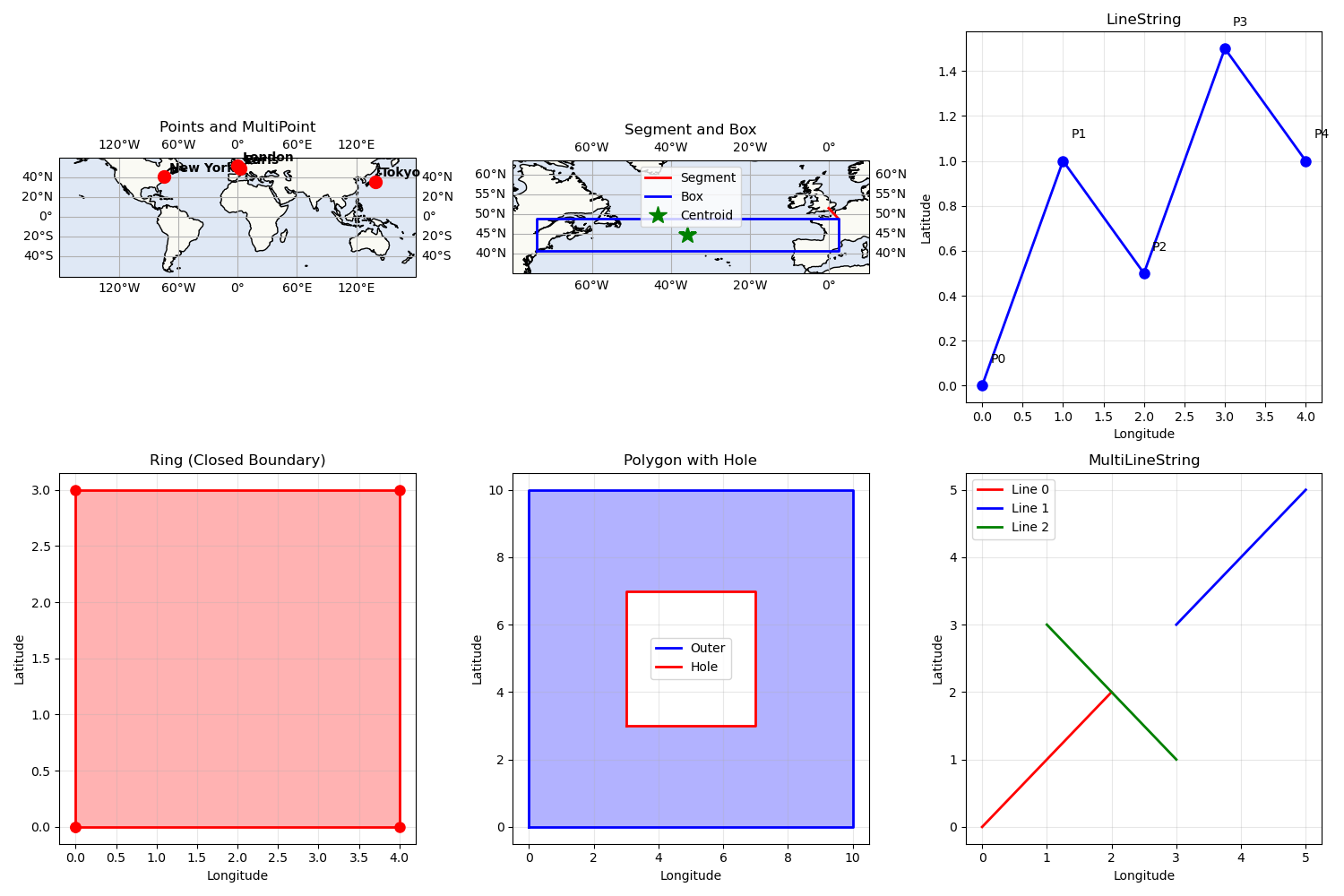
Visualizing Geometric Primitives#
Let’s visualize some of the primitives we’ve created
fig = matplotlib.pyplot.figure(figsize=(15, 10), layout="constrained")

# Plot 1: Points and MultiPoint
ax1 = fig.add_subplot(2, 3, 1, projection=cartopy.crs.PlateCarree())
ax1.add_feature(cartopy.feature.LAND, alpha=0.3)
ax1.add_feature(cartopy.feature.OCEAN, alpha=0.3)
ax1.add_feature(cartopy.feature.COASTLINE)
ax1.gridlines(draw_labels=True, dms=True, x_inline=False, y_inline=False)
ax1.set_extent([-180, 180, -60, 60])

# Plot cities
city_names = ["Paris", "New York", "London", "Tokyo"]
for city, name in zip(cities, city_names, strict=False):
    ax1.plot(
        city.lon,
        city.lat,
        "ro",
        markersize=10,
        transform=cartopy.crs.PlateCarree(),
        zorder=5,
    )
    ax1.text(
        city.lon + 5,
        city.lat + 5,
        name,
        transform=cartopy.crs.PlateCarree(),
        fontsize=10,
        fontweight="bold",
    )

ax1.set_title("Points and MultiPoint")

# Plot 2: Segment and Box
ax2 = fig.add_subplot(2, 3, 2, projection=cartopy.crs.PlateCarree())
ax2.add_feature(cartopy.feature.LAND, alpha=0.3)
ax2.add_feature(cartopy.feature.OCEAN, alpha=0.3)
ax2.add_feature(cartopy.feature.COASTLINE)
ax2.gridlines(draw_labels=True, dms=True, x_inline=False, y_inline=False)
ax2.set_extent([-80, 10, 35, 55])

# Plot segment
ax2.plot(
    *segment.to_arrays(),
    "r-",
    linewidth=2,
    label="Segment",
    transform=cartopy.crs.PlateCarree(),
)

# Plot box
box_lon, box_lat = geographic.algorithms.transform_to_polygon(
    box
).outer.to_arrays()
ax2.plot(
    box_lon,
    box_lat,
    "b-",
    linewidth=2,
    label="Box",
    transform=cartopy.crs.PlateCarree(),
)
ax2.plot(
    centroid.lon,
    centroid.lat,
    "g*",
    markersize=15,
    label="Centroid",
    transform=cartopy.crs.PlateCarree(),
)

ax2.legend()
ax2.set_title("Segment and Box")

# Plot 3: LineString
ax3 = fig.add_subplot(2, 3, 3)
ax3.plot(lon_array, lat_array, "bo-", linewidth=2, markersize=8)
for i, (lon, lat) in enumerate(zip(lon_array, lat_array, strict=False)):
    ax3.text(lon + 0.1, lat + 0.1, f"P{i}", fontsize=10)
ax3.grid(True, alpha=0.3)
ax3.set_xlabel("Longitude")
ax3.set_ylabel("Latitude")
ax3.set_title("LineString")

# Plot 4: Ring
ax4 = fig.add_subplot(2, 3, 4)
ax4.plot(ring_lon, ring_lat, "ro-", linewidth=2, markersize=8)
ax4.fill(ring_lon, ring_lat, alpha=0.3, color="red")
ax4.grid(True, alpha=0.3)
ax4.set_xlabel("Longitude")
ax4.set_ylabel("Latitude")
ax4.set_title("Ring (Closed Boundary)")

# Plot 5: Polygon with Hole
ax5 = fig.add_subplot(2, 3, 5)
ax5.plot(outer_lon, outer_lat, "b-", linewidth=2, label="Outer")
ax5.fill(outer_lon, outer_lat, alpha=0.3, color="blue")
ax5.plot(hole_lon, hole_lat, "r-", linewidth=2, label="Hole")
ax5.fill(hole_lon, hole_lat, alpha=1.0, color="white")
ax5.grid(True, alpha=0.3)
ax5.set_xlabel("Longitude")
ax5.set_ylabel("Latitude")
ax5.set_title("Polygon with Hole")
ax5.legend()

# Plot 6: MultiLineString
ax6 = fig.add_subplot(2, 3, 6)
colors = ["red", "blue", "green"]
for i, (line, color) in enumerate(zip(multiline, colors, strict=False)):
    lons = [pt.lon for pt in line]
    lats = [pt.lat for pt in line]
    ax6.plot(lons, lats, f"{color}", linewidth=2, label=f"Line {i}")
ax6.grid(True, alpha=0.3)
ax6.set_xlabel("Longitude")
ax6.set_ylabel("Latitude")
ax6.set_title("MultiLineString")
ax6.legend()
<matplotlib.legend.Legend object at 0x11fdbe270>
Total running time of the script: (0 minutes 2.380 seconds)
